







What Is Google Block Breaker?
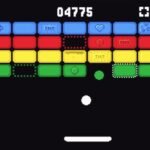
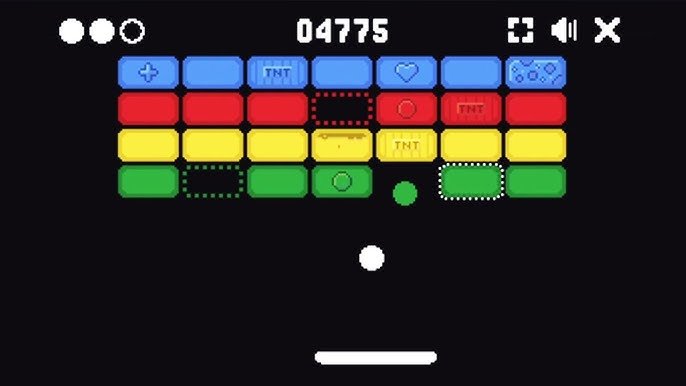
Google Block Breaker is a browser-based arcade game that lives right inside Google’s own products, offering players a quick and fun way to pass the time without ever leaving their search engine. At its core, the game is a modern take on the classic brick breaker genre, where a bouncing ball and a moving paddle work together to smash through rows of colorful blocks. There is no need to download anything or create an account, which makes it one of the easiest games anyone can jump into.
This hidden gem fits perfectly into Google’s long history of surprising users with playful features tucked inside its everyday tools. Google Block Breaker joins a long list of memorable Easter eggs, including Pac-Man, Snake, and the T-Rex dinosaur game in Chrome. These hidden games show a side of Google that many users never expect to find, turning a simple search engine into a source of entertainment during short breaks.
The popularity of Google Block Breaker comes from how accessible and simple it is for players of every age. Since it requires no special skills to start, both kids and adults can enjoy it during a quick break at school, work, or home. Its blend of nostalgic arcade gameplay and modern polish has helped it become a favorite among people searching for a fast, no-fuss gaming experience.
The History Behind Google Block Breaker Game
The story of Google Block Breaker actually begins over a decade ago with a much simpler version hidden inside Google Images. In 2013, Google added a hidden arcade feature to image search results, where searching a specific query transformed the page so that image tiles turned into blocks, with a paddle appearing at the bottom of the screen. This was the original moment that caught most users completely off guard, turning an everyday search into an unexpected game.
The reason behind this surprise feature was tied to a special anniversary. Google launched it to celebrate the 37th anniversary of Atari’s original Breakout game, using the moment as a tribute to a title that had influenced an entire generation of arcade gaming. This clever connection between old and new technology helped the feature spread quickly, as tech media outlets including The Verge, Mashable, and BuzzFeed covered it within 24 hours of it going viral. Eventually, Google removed the original version, with available evidence pointing to a removal around May 2020.
Years later, Google brought the concept back in a more polished form. In January 2025, Google released a proper version under the name Google Block Breaker, and unlike the 2013 version, this one runs on the main search results page, supports keyboard controls alongside mouse and touch, and has structured levels with progression. This relaunch kept the core mechanic of ball, paddle, and blocks the same, while adding features like light and dark themes and a full-screen card that made the experience feel like a real modern game rather than just a hidden trick.
How to Access and Start Playing
Playing the New Google Block Breaker
Getting started with the current version of Google Block Breaker is extremely simple. Players can launch the game directly from their browser by searching Google for “Block Breaker” or “Google Block Breaker” and clicking the play button in the search results. This method works on both desktop and mobile devices, making it easy to jump into a quick game no matter where someone happens to be.
Once the game loads, players are dropped into a colorful board filled with rows of blocks, ready to start bouncing the ball right away. There is no lengthy tutorial or setup process standing in the way of the fun. This straightforward access is part of what makes the game so appealing to casual players who just want something quick and entertaining.
Playing the Classic Atari Breakout Version
For players who want to experience the original Easter egg feeling, there are ways to relive the classic 2013 version as well. The process involves opening Google Images, typing “Atari Breakout” into the search bar, and pressing enter to watch the image results transform into game blocks, after which the paddle appears at the bottom and the ball launches automatically. This version turns actual search result images into the blocks being destroyed, giving it a different flavor from the newer standalone game.
Since the original live version is no longer available directly on Google, some fan-made restorations exist that preserve the old image-wall experience for players who want a bit of nostalgia. These restorations aim to keep the same paddle-and-ball loop, scoring system, and lives structure that made the original feel like a secret game unfolding inside search. It offers a fun way to compare how the concept has evolved over the years.
Platform and Device Compatibility
Google Block Breaker was designed to work smoothly across a wide range of devices and browsers. The game works in all major web browsers like Chrome, Firefox, and Safari, meaning players are not locked into using just one specific browser to enjoy it. This flexibility means the game plays consistently whether someone is using a laptop, desktop computer, or smartphone.
Because it runs entirely through HTML5 technology in the browser, there is no need to install anything extra or download special plugins. This browser-based approach keeps the game lightweight and fast loading, which matters for players who just want a short entertainment break without wasting time waiting for downloads or updates.
Understanding the Core Gameplay
At its heart, Google Block Breaker follows a simple loop that has made brick breaker games popular for decades. Players move a paddle at the bottom of the screen left and right, using it to bounce a ball upward into rows of blocks positioned near the top. Every time the ball connects with a block, that block breaks apart and the player earns points, slowly clearing the board one hit at a time.
As players work through the game, the challenge naturally increases from one level to the next. Each level in the game has a unique layout and progressively greater difficulty, meaning the ball generally moves faster and the block patterns become more complex as players advance further. This gradual increase in difficulty helps keep the game engaging, since early levels ease new players into the mechanics before testing their reflexes more seriously later on.
Lives and scoring form the backbone of how the game tracks success or failure. Players are typically given three lives by default, and the goal is to clear all breakable blocks on screen without letting the ball fall past the paddle. If the ball is missed too many times and all lives run out, the game ends and returns the player to the very beginning, since there is no save feature to preserve progress between sessions.
Types of Blocks and Power-Ups
Not every block in Google Block Breaker behaves the same way, which adds an extra layer of strategy to the game. Some blocks only require a single hit to destroy, while others take two or more hits before they break apart completely. On top of these standard blocks, indestructible blocks cannot be broken at all and stay fixed throughout the round, acting as permanent obstacles that players must learn to work around.
Power-ups add an exciting twist to the otherwise straightforward gameplay loop. Common power-ups include a wider paddle, extra balls, and speed changes, each dropping from certain blocks once they are broken. A wider paddle makes it easier to keep the ball in play, while multiple balls can help clear the board faster, though they also add a bit of chaos to track during fast-paced moments.
Understanding how these power-ups affect strategy can make a big difference in how far a player progresses. Grabbing a wider paddle early on is often considered a smart move since it reduces missed shots during the trickier parts of a level. Meanwhile, speed-up power-ups can make the ball harder to control, but they also offer a chance to clear blocks more quickly for players who are comfortable with a faster pace.
Controls and Paddle Mechanics
Google Block Breaker offers flexible control options to fit different devices and personal preferences. Players can move the paddle using the mouse, keyboard, or touchscreen, giving them the freedom to choose whichever method feels most comfortable. This variety makes the game equally enjoyable whether someone is playing on a desktop computer or scrolling through their phone during a short break.
The position where the ball hits the paddle plays a major role in determining where it goes next. Hitting the ball near the center sends it straight upward, while hitting it toward the edges sends it off at a much sharper angle. Learning to control this angle intentionally allows players to redirect the ball toward specific areas of the board rather than relying purely on random bounces.
Mastering these paddle mechanics is often the difference between casual play and truly skilled play. The outer thirds of the paddle produce sharp, angled shots useful for reaching blocks tucked into corners, while the center section gives a more predictable, near-vertical return that works well for tightly packed rows. Practicing this kind of deliberate aiming, rather than just reacting to the ball as it comes, puts players in much more control of their overall performance.
Tips and Strategies to Win
One of the smartest early strategies in Google Block Breaker involves prioritizing power-ups whenever possible. Since a wider paddle reduces missed shots and extra balls speed up how quickly blocks get cleared, grabbing these bonuses early can set players up for much smoother runs through later levels. Catching every available power-up during the first few stages, while the ball speed is still manageable, tends to pay off significantly as the difficulty ramps up.
Handling multi-ball situations calls for a slightly different mindset than normal single-ball play. When a power-up splits the ball into two or three, it helps to focus on the one most likely to escape rather than trying to track every single ball at once. Missing one ball during a multi-ball phase does not end the round immediately, since the level continues as long as at least one ball stays in play, which makes these moments less stressful than they might initially seem.
Indestructible blocks, while frustrating at first glance, can actually become useful tools rather than simple obstacles. Since these fixed blocks cannot be broken no matter how many times the ball hits them, players can angle their shots so the ball bounces off them toward clusters of weaker, breakable blocks nearby. Trying to repeatedly aim directly at an indestructible block wastes valuable time, so learning to work around them strategically is a much smarter long-term approach.
Common Questions and Misconceptions
A common question players ask is whether Google Block Breaker can be played without an internet connection. The straightforward answer is no, since the Google Doodle Block Breaker runs in-browser and requires an active connection, unlike some other Google games that may offer limited offline functionality. This means players will need a stable connection each time they want to start a new session.
Another point of confusion involves the many different names people use when searching for the game. Google brick breaker and blockbreaker are informal names for the same type of game, and people sometimes also call it a block braker or block beaker, which are simply common misspellings of the original title. All of these variations generally lead back to the same core brick breaker experience built on Google’s platform.
It is also worth clearing up the difference between the older and newer versions of the game, since many players confuse the two. The Google Doodle version differs from the original 2013 image-based Easter egg, since the newer release has its own full-screen card, colored blocks, and power-ups, while the older Atari Breakout trick worked by turning actual image search results into the bricks themselves. Knowing this distinction helps players understand which version they are actually experiencing when they come across guides or discussions online.
Final Thoughts on Google Block Breaker
Google Block Breaker continues to stand out as one of the more memorable ways a major tech company has blended nostalgia with modern gaming convenience. Its roots in the original 2013 Atari Breakout Easter egg give it a special place in internet history, while the 2025 relaunch proves that simple, well-designed arcade games can still capture attention even in a world full of complex video games. The blend of retro charm and smooth modern design keeps players coming back for just one more round.
This game is a great fit for almost anyone looking for a short, satisfying distraction. Students taking a break between classes, office workers stepping away from a busy schedule, or casual gamers who grew up with classic arcade titles will all likely find something enjoyable about its simple yet challenging gameplay. Its accessibility across devices and browsers means there is rarely a good excuse not to give it a try.
For anyone curious about experiencing a piece of gaming history hidden inside one of the world’s most used websites, Google Block Breaker offers an easy and rewarding way to do just that. Whether the goal is chasing a high score, mastering paddle angles, or simply enjoying a nostalgic throwback to classic arcade fun, this hidden game delivers a satisfying experience in just a few clicks. Give it a try during your next short break, and see how far you can get through its ever-challenging levels.